
tape cmd dans la barre de recherche, et clique sur invite de commandes
tu vas être dans la fenêtre de commandes
tape
ping 192.168.8.170 -n 1
et dis moi ce que tu obtiens en retour
PS et explique comment tu as obtenu cette adresse IP qui est plus que folklorique
Teslamate sur Raspberry Pi - Tutoriel
-
Tigerbill17

- Référent

- Messages : 1850
- Inscription : 12 sept. 2023
- Localisation : à côté de Royan
- Voiture : TMY prop Berlin
-
Zougaille

- Enthousiaste

- Messages : 127
- Inscription : 14 nov. 2023
- Localisation : Saône et Loire
- Voiture : Model Y
Re: Teslamate sur Raspberry Pi - Tutoriel
Je n'aurai plus accès a mon PC un certain temps du coup là je viens de recommencer de chez moi (sur Macbook) et je bloc au même point.
Cette fameuse adresse qui est celle la chez moi : 192.168.1.204:4000
(Teslamate est bien installé sur mon Raspberry)
Cette fameuse adresse qui est celle la chez moi : 192.168.1.204:4000
(Teslamate est bien installé sur mon Raspberry)
Model Y 🇨🇳 - 2023
-
Tigerbill17
- Référent
- Messages : 1850
- Inscription : 12 sept. 2023
- Localisation : à côté de Royan
- Voiture : TMY prop Berlin
Re: Teslamate sur Raspberry Pi - Tutoriel
@Zougaille
Désolé de devoir te dire ça, mais tu as l'art de ne pas répondre aux questions.
Je t'avais demandé
1) si tu étais sur Windows ( réponse oui )
2) comment tu avais trouvé l' IP qui ne répondait pas et que tu avais fournie en photo ( 192.168.8.170)
et tu me réponds maintenant
1) que tu es sur Mac
2) tu me donnes une autre adresse IP que la première, et toujours sans me dire comment tu l'as trouvée
Comment veux tu qu'on puisse t'aider ? Hum ?
Et au passage, cette nouvelle mouture d'IP est aussi insolite que la première
Désolé de devoir te dire ça, mais tu as l'art de ne pas répondre aux questions.
Je t'avais demandé
1) si tu étais sur Windows ( réponse oui )
2) comment tu avais trouvé l' IP qui ne répondait pas et que tu avais fournie en photo ( 192.168.8.170)
et tu me réponds maintenant
1) que tu es sur Mac
2) tu me donnes une autre adresse IP que la première, et toujours sans me dire comment tu l'as trouvée
Comment veux tu qu'on puisse t'aider ? Hum ?
Et au passage, cette nouvelle mouture d'IP est aussi insolite que la première
-
Zougaille
- Enthousiaste
- Messages : 127
- Inscription : 14 nov. 2023
- Localisation : Saône et Loire
- Voiture : Model Y
Re: Teslamate sur Raspberry Pi - Tutoriel

Je voulais connecté mon Raspberry sur mon lieu de travail qui est équipé de windows car je pensai plus accessible de la faire avec windows mais je m'aperçoit que c'est autant voir plus galère. Du coup je me suis dit que je le ferait depuis mon domicile qui est équipé chez la pomme.
Pour l'adresse IP de mon lieu de travail je ne peux pas te dire pourquoi elle ressemble a ça

Et pour l'adresse ip sur la quelle je suis connecté chez moi (en wifi) est 192.168.1.204

Model Y 🇨🇳 - 2023
-
Tigerbill17
- Référent
- Messages : 1850
- Inscription : 12 sept. 2023
- Localisation : à côté de Royan
- Voiture : TMY prop Berlin
Re: Teslamate sur Raspberry Pi - Tutoriel
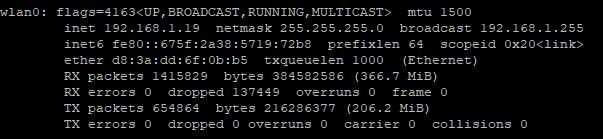
connecte toi à ton raspberry en SSH, et à l'invite de commandes, tape
ifconfig
tu vas avoir une liste de toutes tes connexions réseau
regarde celle qui se nomme:
wlan0
tu vas voir l'adresse IP de ton raspberry: c'est celle là qu'il faut utiliser ( inet )
ex, chez moi, inet 192.168.1.19
ifconfig
tu vas avoir une liste de toutes tes connexions réseau
regarde celle qui se nomme:
wlan0
tu vas voir l'adresse IP de ton raspberry: c'est celle là qu'il faut utiliser ( inet )
ex, chez moi, inet 192.168.1.19

-
Tigerbill17
- Référent
- Messages : 1850
- Inscription : 12 sept. 2023
- Localisation : à côté de Royan
- Voiture : TMY prop Berlin
Re: Teslamate sur Raspberry Pi - Tutoriel
C'est la bonne IP
Il est démarré, docker , avec Teslamate ?
tape
docker ps
Il est démarré, docker , avec Teslamate ?
tape
docker ps
-
Zougaille
- Enthousiaste
- Messages : 127
- Inscription : 14 nov. 2023
- Localisation : Saône et Loire
- Voiture : Model Y
Re: Teslamate sur Raspberry Pi - Tutoriel
damien@raspberrypi:~ $ docker ps
permission denied while trying to connect to the Docker daemon socket at unix:///var/run/docker.sock: Get "http://%2Fvar%2Frun%2Fdocker.sock/v1.24/containers/json": dial unix /var/run/docker.sock: connect: permission denied
permission denied while trying to connect to the Docker daemon socket at unix:///var/run/docker.sock: Get "http://%2Fvar%2Frun%2Fdocker.sock/v1.24/containers/json": dial unix /var/run/docker.sock: connect: permission denied
Model Y 🇨🇳 - 2023
-
Tigerbill17
- Référent
- Messages : 1850
- Inscription : 12 sept. 2023
- Localisation : à côté de Royan
- Voiture : TMY prop Berlin

-
Tigerbill17
- Référent
- Messages : 1850
- Inscription : 12 sept. 2023
- Localisation : à côté de Royan
- Voiture : TMY prop Berlin
Re: Teslamate sur Raspberry Pi - Tutoriel
Ton docker est à l'arrêt
sudo docker start
sudo docker start
-
Ramses

- Passionné

- Messages : 261
- Inscription : 04 août 2023
- Localisation : Nancy
- Voiture : Model Y SR
Re: Teslamate sur Raspberry Pi - Tutoriel
Bonsoir,
Je voudrais savoir si en prenant un abonnement à Teslamate, on peut récupérer les données que j'ai sur mon Mac ?
Merci
Je voudrais savoir si en prenant un abonnement à Teslamate, on peut récupérer les données que j'ai sur mon Mac ?
Merci
Model Y SR - Blanche - Int. Blanc Premium - Jantes 19"
Octobre 2023
Octobre 2023
-
Zougaille
- Enthousiaste
- Messages : 127
- Inscription : 14 nov. 2023
- Localisation : Saône et Loire
- Voiture : Model Y
Re: Teslamate sur Raspberry Pi - Tutoriel
damien@raspberrypi:~ $ sudo docker start
"docker start" requires at least 1 argument.
See 'docker start --help'.
Usage: docker start [OPTIONS] CONTAINER [CONTAINER...]
Start one or more stopped containers
damien@raspberrypi:~ $ sudo docker ps
CONTAINER ID IMAGE COMMAND CREATED STATUS PORTS NAMES
Model Y 🇨🇳 - 2023
-
Tigerbill17
- Référent
- Messages : 1850
- Inscription : 12 sept. 2023
- Localisation : à côté de Royan
- Voiture : TMY prop Berlin
-
Zougaille
- Enthousiaste
- Messages : 127
- Inscription : 14 nov. 2023
- Localisation : Saône et Loire
- Voiture : Model Y
Re: Teslamate sur Raspberry Pi - Tutoriel
damien@raspberrypi:~ $ docker run
"docker run" requires at least 1 argument.
See 'docker run --help'.
Usage: docker run [OPTIONS] IMAGE [COMMAND] [ARG...]
Create and run a new container from an image
"docker run" requires at least 1 argument.
See 'docker run --help'.
Usage: docker run [OPTIONS] IMAGE [COMMAND] [ARG...]
Create and run a new container from an image
Model Y 🇨🇳 - 2023
-
Tigerbill17
- Référent
- Messages : 1850
- Inscription : 12 sept. 2023
- Localisation : à côté de Royan
- Voiture : TMY prop Berlin
Re: Teslamate sur Raspberry Pi - Tutoriel
sudo docker run teslamate
grrrrrr

grrrrrr
-
Zougaille
- Enthousiaste
- Messages : 127
- Inscription : 14 nov. 2023
- Localisation : Saône et Loire
- Voiture : Model Y
Re: Teslamate sur Raspberry Pi - Tutoriel
damien@raspberrypi:~ $ sudo docker run teslamate
Unable to find image 'teslamate:latest' locally
docker: Error response from daemon: pull access denied for teslamate, repository does not exist or may require 'docker login': denied: requested access to the resource is denied.
See 'docker run --help'.
Unable to find image 'teslamate:latest' locally
docker: Error response from daemon: pull access denied for teslamate, repository does not exist or may require 'docker login': denied: requested access to the resource is denied.
See 'docker run --help'.
Model Y 🇨🇳 - 2023
-
Zougaille
- Enthousiaste
- Messages : 127
- Inscription : 14 nov. 2023
- Localisation : Saône et Loire
- Voiture : Model Y
Re: Teslamate sur Raspberry Pi - Tutoriel
damien@raspberrypi:~ $ docker run --help
Usage: docker run [OPTIONS] IMAGE [COMMAND] [ARG...]
Create and run a new container from an image
Aliases:
docker container run, docker run
Options:
--add-host list Add a custom host-to-IP mapping
(host:ip)
--annotation map Add an annotation to the
container (passed through to the
OCI runtime) (default map[])
-a, --attach list Attach to STDIN, STDOUT or STDERR
--blkio-weight uint16 Block IO (relative weight),
between 10 and 1000, or 0 to
disable (default 0)
--blkio-weight-device list Block IO weight (relative device
weight) (default [])
--cap-add list Add Linux capabilities
--cap-drop list Drop Linux capabilities
--cgroup-parent string Optional parent cgroup for the
container
--cgroupns string Cgroup namespace to use
(host|private)
'host': Run the container in
the Docker host's cgroup
namespace
'private': Run the container in
its own private cgroup namespace
'': Use the cgroup
namespace as configured by the
default-cgroupns-mode
option on the daemon (default)
--cidfile string Write the container ID to the file
--cpu-count int CPU count (Windows only)
--cpu-percent int CPU percent (Windows only)
--cpu-period int Limit CPU CFS (Completely Fair
Scheduler) period
--cpu-quota int Limit CPU CFS (Completely Fair
Scheduler) quota
--cpu-rt-period int Limit CPU real-time period in
microseconds
--cpu-rt-runtime int Limit CPU real-time runtime in
microseconds
-c, --cpu-shares int CPU shares (relative weight)
--cpus decimal Number of CPUs
--cpuset-cpus string CPUs in which to allow execution
(0-3, 0,1)
--cpuset-mems string MEMs in which to allow execution
(0-3, 0,1)
-d, --detach Run container in background and
print container ID
--detach-keys string Override the key sequence for
detaching a container
--device list Add a host device to the container
--device-cgroup-rule list Add a rule to the cgroup allowed
devices list
--device-read-bps list Limit read rate (bytes per
second) from a device (default [])
--device-read-iops list Limit read rate (IO per second)
from a device (default [])
--device-write-bps list Limit write rate (bytes per
second) to a device (default [])
--device-write-iops list Limit write rate (IO per second)
to a device (default [])
--disable-content-trust Skip image verification (default
true)
--dns list Set custom DNS servers
--dns-option list Set DNS options
--dns-search list Set custom DNS search domains
--domainname string Container NIS domain name
--entrypoint string Overwrite the default ENTRYPOINT
of the image
-e, --env list Set environment variables
--env-file list Read in a file of environment
variables
--expose list Expose a port or a range of ports
--gpus gpu-request GPU devices to add to the
container ('all' to pass all GPUs)
--group-add list Add additional groups to join
--health-cmd string Command to run to check health
--health-interval duration Time between running the check
(ms|s|m|h) (default 0s)
--health-retries int Consecutive failures needed to
report unhealthy
--health-start-interval duration Time between running the check
during the start period
(ms|s|m|h) (default 0s)
--health-start-period duration Start period for the container
to initialize before starting
health-retries countdown
(ms|s|m|h) (default 0s)
--health-timeout duration Maximum time to allow one check
to run (ms|s|m|h) (default 0s)
--help Print usage
-h, --hostname string Container host name
--init Run an init inside the container
that forwards signals and reaps
processes
-i, --interactive Keep STDIN open even if not attached
--io-maxbandwidth bytes Maximum IO bandwidth limit for
the system drive (Windows only)
--io-maxiops uint Maximum IOps limit for the
system drive (Windows only)
--ip string IPv4 address (e.g., 172.30.100.104)
--ip6 string IPv6 address (e.g., 2001:db8::33)
--ipc string IPC mode to use
--isolation string Container isolation technology
--kernel-memory bytes Kernel memory limit
-l, --label list Set meta data on a container
--label-file list Read in a line delimited file of
labels
--link list Add link to another container
--link-local-ip list Container IPv4/IPv6 link-local
addresses
--log-driver string Logging driver for the container
--log-opt list Log driver options
--mac-address string Container MAC address (e.g.,
92:d0:c6:0a:29:33)
-m, --memory bytes Memory limit
--memory-reservation bytes Memory soft limit
--memory-swap bytes Swap limit equal to memory plus
swap: '-1' to enable unlimited swap
--memory-swappiness int Tune container memory swappiness
(0 to 100) (default -1)
--mount mount Attach a filesystem mount to the
container
--name string Assign a name to the container
--network network Connect a container to a network
--network-alias list Add network-scoped alias for the
container
--no-healthcheck Disable any container-specified
HEALTHCHECK
--oom-kill-disable Disable OOM Killer
--oom-score-adj int Tune host's OOM preferences
(-1000 to 1000)
--pid string PID namespace to use
--pids-limit int Tune container pids limit (set
-1 for unlimited)
--platform string Set platform if server is
multi-platform capable
--privileged Give extended privileges to this
container
-p, --publish list Publish a container's port(s) to
the host
-P, --publish-all Publish all exposed ports to
random ports
--pull string Pull image before running
("always", "missing", "never")
(default "missing")
-q, --quiet Suppress the pull output
--read-only Mount the container's root
filesystem as read only
--restart string Restart policy to apply when a
container exits (default "no")
--rm Automatically remove the
container when it exits
--runtime string Runtime to use for this container
--security-opt list Security Options
--shm-size bytes Size of /dev/shm
--sig-proxy Proxy received signals to the
process (default true)
--stop-signal string Signal to stop the container
--stop-timeout int Timeout (in seconds) to stop a
container
--storage-opt list Storage driver options for the
container
--sysctl map Sysctl options (default map[])
--tmpfs list Mount a tmpfs directory
-t, --tty Allocate a pseudo-TTY
--ulimit ulimit Ulimit options (default [])
-u, --user string Username or UID (format:
<name|uid>[:<group|gid>])
--userns string User namespace to use
--uts string UTS namespace to use
-v, --volume list Bind mount a volume
--volume-driver string Optional volume driver for the
container
--volumes-from list Mount volumes from the specified
container(s)
-w, --workdir string Working directory inside the
container
Usage: docker run [OPTIONS] IMAGE [COMMAND] [ARG...]
Create and run a new container from an image
Aliases:
docker container run, docker run
Options:
--add-host list Add a custom host-to-IP mapping
(host:ip)
--annotation map Add an annotation to the
container (passed through to the
OCI runtime) (default map[])
-a, --attach list Attach to STDIN, STDOUT or STDERR
--blkio-weight uint16 Block IO (relative weight),
between 10 and 1000, or 0 to
disable (default 0)
--blkio-weight-device list Block IO weight (relative device
weight) (default [])
--cap-add list Add Linux capabilities
--cap-drop list Drop Linux capabilities
--cgroup-parent string Optional parent cgroup for the
container
--cgroupns string Cgroup namespace to use
(host|private)
'host': Run the container in
the Docker host's cgroup
namespace
'private': Run the container in
its own private cgroup namespace
'': Use the cgroup
namespace as configured by the
default-cgroupns-mode
option on the daemon (default)
--cidfile string Write the container ID to the file
--cpu-count int CPU count (Windows only)
--cpu-percent int CPU percent (Windows only)
--cpu-period int Limit CPU CFS (Completely Fair
Scheduler) period
--cpu-quota int Limit CPU CFS (Completely Fair
Scheduler) quota
--cpu-rt-period int Limit CPU real-time period in
microseconds
--cpu-rt-runtime int Limit CPU real-time runtime in
microseconds
-c, --cpu-shares int CPU shares (relative weight)
--cpus decimal Number of CPUs
--cpuset-cpus string CPUs in which to allow execution
(0-3, 0,1)
--cpuset-mems string MEMs in which to allow execution
(0-3, 0,1)
-d, --detach Run container in background and
print container ID
--detach-keys string Override the key sequence for
detaching a container
--device list Add a host device to the container
--device-cgroup-rule list Add a rule to the cgroup allowed
devices list
--device-read-bps list Limit read rate (bytes per
second) from a device (default [])
--device-read-iops list Limit read rate (IO per second)
from a device (default [])
--device-write-bps list Limit write rate (bytes per
second) to a device (default [])
--device-write-iops list Limit write rate (IO per second)
to a device (default [])
--disable-content-trust Skip image verification (default
true)
--dns list Set custom DNS servers
--dns-option list Set DNS options
--dns-search list Set custom DNS search domains
--domainname string Container NIS domain name
--entrypoint string Overwrite the default ENTRYPOINT
of the image
-e, --env list Set environment variables
--env-file list Read in a file of environment
variables
--expose list Expose a port or a range of ports
--gpus gpu-request GPU devices to add to the
container ('all' to pass all GPUs)
--group-add list Add additional groups to join
--health-cmd string Command to run to check health
--health-interval duration Time between running the check
(ms|s|m|h) (default 0s)
--health-retries int Consecutive failures needed to
report unhealthy
--health-start-interval duration Time between running the check
during the start period
(ms|s|m|h) (default 0s)
--health-start-period duration Start period for the container
to initialize before starting
health-retries countdown
(ms|s|m|h) (default 0s)
--health-timeout duration Maximum time to allow one check
to run (ms|s|m|h) (default 0s)
--help Print usage
-h, --hostname string Container host name
--init Run an init inside the container
that forwards signals and reaps
processes
-i, --interactive Keep STDIN open even if not attached
--io-maxbandwidth bytes Maximum IO bandwidth limit for
the system drive (Windows only)
--io-maxiops uint Maximum IOps limit for the
system drive (Windows only)
--ip string IPv4 address (e.g., 172.30.100.104)
--ip6 string IPv6 address (e.g., 2001:db8::33)
--ipc string IPC mode to use
--isolation string Container isolation technology
--kernel-memory bytes Kernel memory limit
-l, --label list Set meta data on a container
--label-file list Read in a line delimited file of
labels
--link list Add link to another container
--link-local-ip list Container IPv4/IPv6 link-local
addresses
--log-driver string Logging driver for the container
--log-opt list Log driver options
--mac-address string Container MAC address (e.g.,
92:d0:c6:0a:29:33)
-m, --memory bytes Memory limit
--memory-reservation bytes Memory soft limit
--memory-swap bytes Swap limit equal to memory plus
swap: '-1' to enable unlimited swap
--memory-swappiness int Tune container memory swappiness
(0 to 100) (default -1)
--mount mount Attach a filesystem mount to the
container
--name string Assign a name to the container
--network network Connect a container to a network
--network-alias list Add network-scoped alias for the
container
--no-healthcheck Disable any container-specified
HEALTHCHECK
--oom-kill-disable Disable OOM Killer
--oom-score-adj int Tune host's OOM preferences
(-1000 to 1000)
--pid string PID namespace to use
--pids-limit int Tune container pids limit (set
-1 for unlimited)
--platform string Set platform if server is
multi-platform capable
--privileged Give extended privileges to this
container
-p, --publish list Publish a container's port(s) to
the host
-P, --publish-all Publish all exposed ports to
random ports
--pull string Pull image before running
("always", "missing", "never")
(default "missing")
-q, --quiet Suppress the pull output
--read-only Mount the container's root
filesystem as read only
--restart string Restart policy to apply when a
container exits (default "no")
--rm Automatically remove the
container when it exits
--runtime string Runtime to use for this container
--security-opt list Security Options
--shm-size bytes Size of /dev/shm
--sig-proxy Proxy received signals to the
process (default true)
--stop-signal string Signal to stop the container
--stop-timeout int Timeout (in seconds) to stop a
container
--storage-opt list Storage driver options for the
container
--sysctl map Sysctl options (default map[])
--tmpfs list Mount a tmpfs directory
-t, --tty Allocate a pseudo-TTY
--ulimit ulimit Ulimit options (default [])
-u, --user string Username or UID (format:
<name|uid>[:<group|gid>])
--userns string User namespace to use
--uts string UTS namespace to use
-v, --volume list Bind mount a volume
--volume-driver string Optional volume driver for the
container
--volumes-from list Mount volumes from the specified
container(s)
-w, --workdir string Working directory inside the
container
Model Y 🇨🇳 - 2023
-
Tigerbill17
- Référent
- Messages : 1850
- Inscription : 12 sept. 2023
- Localisation : à côté de Royan
- Voiture : TMY prop Berlin
Re: Teslamate sur Raspberry Pi - Tutoriel
Bon....
sudo docker compose up -d
sudo docker compose up -d
-
Zougaille
- Enthousiaste
- Messages : 127
- Inscription : 14 nov. 2023
- Localisation : Saône et Loire
- Voiture : Model Y
Re: Teslamate sur Raspberry Pi - Tutoriel
damien@raspberrypi:~ $ sudo docker compose up -d
[+] Running 45/18
✔ teslamate 6 layers [⣿⣿⣿⣿⣿⣿] 0B/0B Pulled 114.2s
✔ grafana 18 layers [⣿⣿⣿⣿⣿⣿⣿⣿⣿⣿⣿⣿⣿⣿⣿⣿⣿⣿] 0B/0B Pulled 136.2s
✔ mosquitto 3 layers [⣿⣿⣿] 0B/0B Pulled 86.0s
✔ database 14 layers [⣿⣿⣿⣿⣿⣿⣿⣿⣿⣿⣿⣿⣿⣿] 0B/0B Pulled 123.4s
[+] Running 4/9
⠙ Network damien_default Cre... 10.1s
⠧ Volume "damien_mosquitto-data" Created 9.6s
⠦ Volume "damien_teslamate-db" Created 9.6s
⠦ Volume "damien_teslamate-grafana-data" Created 9.6s
⠦ Volume "damien_mosquitto-conf" Created 9.5s
✔ Container damien-grafana-1 Started 9.3s
✔ Container damien-mosquitto-1 Started 9.4s
✔ Container damien-teslamate-1 Started 9.3s
✔ Container damien-database-1 Started 9.5s
[+] Running 45/18
✔ teslamate 6 layers [⣿⣿⣿⣿⣿⣿] 0B/0B Pulled 114.2s
✔ grafana 18 layers [⣿⣿⣿⣿⣿⣿⣿⣿⣿⣿⣿⣿⣿⣿⣿⣿⣿⣿] 0B/0B Pulled 136.2s
✔ mosquitto 3 layers [⣿⣿⣿] 0B/0B Pulled 86.0s
✔ database 14 layers [⣿⣿⣿⣿⣿⣿⣿⣿⣿⣿⣿⣿⣿⣿] 0B/0B Pulled 123.4s
[+] Running 4/9
⠙ Network damien_default Cre... 10.1s
⠧ Volume "damien_mosquitto-data" Created 9.6s
⠦ Volume "damien_teslamate-db" Created 9.6s
⠦ Volume "damien_teslamate-grafana-data" Created 9.6s
⠦ Volume "damien_mosquitto-conf" Created 9.5s
✔ Container damien-grafana-1 Started 9.3s
✔ Container damien-mosquitto-1 Started 9.4s
✔ Container damien-teslamate-1 Started 9.3s
✔ Container damien-database-1 Started 9.5s
Model Y 🇨🇳 - 2023
Créer un compte ou se connecter pour rejoindre la discussion
Vous devez être membre pour pouvoir répondre
Créer un compte
Vous n‘êtes pas membre ? Inscrivez-vous pour rejoindre notre communauté
Les membres peuvent créer leurs propres sujets et s‘abonner à des sujets
C‘est gratuit et cela ne prend qu‘une minute